
Advanced Android Reverse Engineering Techniques
Android applications present unique challenges for reverse engineers due to their layered architecture, diverse obfuscation techniques, and combination of Java/Kotlin bytecode with native ARM code. This guide explores advanced methodologies for dissecting Android APKs and uncovering hidden functionality.
Android Application Architecture
Understanding the structure is essential before diving into analysis:
APK Structure:
├── AndroidManifest.xml # App configuration & permissions
├── classes.dex # Dalvik bytecode (Java/Kotlin)
├── lib/ # Native libraries (.so files)
│ ├── armeabi-v7a/
│ ├── arm64-v8a/
│ └── x86/
├── res/ # Resources (layouts, strings, images)
├── assets/ # Additional app assets
├── META-INF/ # Signing certificates
└── resources.arsc # Compiled resources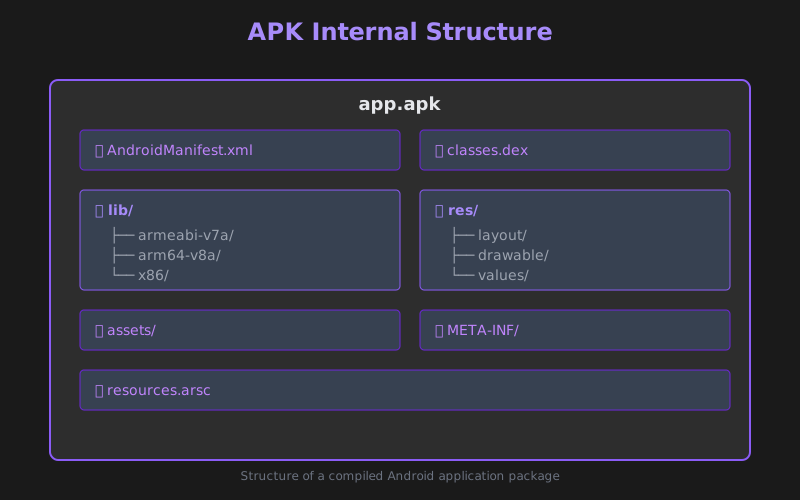 Figura 1: Estructura interna de un archivo APK
Essential Reverse Engineering Tools
Static Analysis Framework
JADX - DEX to Java decompiler:
# Decompile APK to readable Java
jadx -d output/ app.apk

# GUI mode for interactive analysis
jadx-gui app.apk
APKTool - Resource extraction and modification:
# Decode resources to original form
apktool d app.apk -o decoded/

# Rebuild modified APK
apktool b decoded/ -o modified.apk
Ghidra/IDA Pro - Native library analysis:
- ARM/ARM64 disassembly
- JNI function identification
- Cross-references between Java and native code
Dynamic Analysis Tools
Frida - Runtime instrumentation framework:
// Hook a Java method
Java.perform(function() {
    var MainActivity = Java.use("com.example.MainActivity");

    MainActivity.checkLicense.implementation = function(key) {
        console.log("[+] License key: " + key);
        return true;  // Always return valid
    };
});
Objection - Frida-powered mobile security toolkit:
# Spawn app with Frida
objection -g com.example.app explore

# Disable SSL pinning
android sslpinning disable

# List activities
android hooking list activities
Reverse Engineering Workflow
1. Initial Reconnaissance
Extract and examine the APK:
# Unzip APK (it's just a ZIP file)
unzip app.apk -d extracted/

# Analyze manifest
aapt dump badging app.apk
aapt dump permissions app.apk

# Check for obfuscation
strings classes.dex | grep -E "^[a-z]$|^[a-z]{2}$"
2. Decompiling and Source Analysis
Convert DEX bytecode to readable Java:
// Example decompiled code
public class MainActivity extends AppCompatActivity {
    private native String getSecretKey();

    protected void onCreate(Bundle savedInstanceState) {
        super.onCreate(savedInstanceState);
        System.loadLibrary("native-lib");

        String key = getSecretKey();
        if (validateKey(key)) {
            startPremiumFeatures();
        }
    }
}
Analysis checklist:
- Identify entry points (Activities, Services, Receivers)
- Locate sensitive operations (encryption, network, authentication)
- Find native library loading
- Track data flow from user input to sensitive operations
3. Native Library Analysis
Many apps use JNI for critical functionality:
# List exported symbols
nm -D lib/arm64-v8a/libnative-lib.so

# Find JNI functions
nm -D libnative-lib.so | grep Java_
Common JNI patterns:
// Typical JNI function signature
JNIEXPORT jstring JNICALL
Java_com_example_MainActivity_getSecretKey(
    JNIEnv* env,
    jobject thiz
) {
    char key[] = {0x48, 0x65, 0x6c, 0x6c, 0x6f, 0x00};
    return (*env)->NewStringUTF(env, key);
}
Load in Ghidra for deeper analysis:
- Import the
.sofile - Set architecture (ARM/ARM64)
- Analyze function calls and string references
- Identify cryptographic operations
Defeating Common Obfuscation Techniques
ProGuard/R8 Obfuscation
Obfuscated code characteristics:
// Before obfuscation
public class LicenseValidator {
    public boolean validatePremiumKey(String key) {
        return key.equals("PREMIUM-2024");
    }
}

// After ProGuard
public class a {
    public boolean a(String str) {
        return str.equals("PREMIUM-2024");
    }
}
Mitigation strategies:
- Use dynamic analysis to observe runtime behavior
- Set breakpoints on suspicious methods
- Rename variables/classes based on context
- Search for string constants that weren’t obfuscated
String Encryption
Many apps encrypt sensitive strings:
// Encrypted string pattern
private static String decrypt(String encrypted) {
    byte[] data = Base64.decode(encrypted, 0);
    // XOR decryption example
    for (int i = 0; i < data.length; i++) {
        data[i] ^= 0x42;
    }
    return new String(data);
}
Decryption approach:
# Python script to decrypt
import base64

def decrypt_string(encrypted):
    data = base64.b64decode(encrypted)
    return bytes([b ^ 0x42 for b in data]).decode()

encrypted = "HwwHBwAMDw=="
print(decrypt_string(encrypted))
Control Flow Obfuscation
State machine-based execution:
// Flattened control flow
int state = 0;
while (true) {
    switch (state) {
        case 0:
            // Original code block 1
            state = 3;
            break;
        case 1:
            // Original code block 3
            state = 2;
            break;
        case 2:
            // Original code block 4
            return;
        case 3:
            // Original code block 2
            state = 1;
            break;
    }
}
Analysis strategy: Use dynamic analysis to trace actual execution path.
Dynamic Instrumentation with Frida
Hooking Java Methods
// Comprehensive method hooking
Java.perform(function() {
    var targetClass = Java.use("com.example.crypto.AESUtil");

    // Hook encryption method
    targetClass.encrypt.overload('java.lang.String', 'java.lang.String')
        .implementation = function(plaintext, key) {

        console.log("[+] Encryption called");
        console.log("    Plaintext: " + plaintext);
        console.log("    Key: " + key);

        var result = this.encrypt(plaintext, key);
        console.log("    Result: " + result);

        return result;
    };
});
Bypassing Root Detection
// Disable root checks
Java.perform(function() {
    var RootUtil = Java.use("com.example.security.RootUtil");

    RootUtil.isRooted.implementation = function() {
        console.log("[+] Root check bypassed");
        return false;
    };

    RootUtil.checkSU.implementation = function() {
        console.log("[+] SU check bypassed");
        return false;
    };
});
SSL Pinning Bypass
// Universal SSL pinning bypass
Java.perform(function() {
    var TrustManager = Java.use('javax.net.ssl.X509TrustManager');
    var SSLContext = Java.use('javax.net.ssl.SSLContext');

    var TrustManagerImpl = Java.registerClass({
        name: 'com.example.TrustManagerImpl',
        implements: [TrustManager],
        methods: {
            checkClientTrusted: function(chain, authType) {},
            checkServerTrusted: function(chain, authType) {},
            getAcceptedIssuers: function() { return []; }
        }
    });

    var context = SSLContext.getInstance('TLS');
    context.init(null, [TrustManagerImpl.$new()], null);
    SSLContext.setDefault(context);
});
Analyzing Encrypted Network Traffic
1. Setup Interception Proxy
# Configure device to use Burp Suite/mitmproxy
adb shell settings put global http_proxy <proxy_ip>:8080

# Install CA certificate
adb push burp_ca.der /sdcard/
2. Defeat SSL Pinning
Use Frida script or patch the APK:
# Using objection
objection -g com.example.app explore
android sslpinning disable
3. Analyze API Calls
Look for sensitive endpoints:
POST /api/v1/auth/login
Content-Type: application/json

{
    "username": "user@example.com",
    "password": "hashed_password",
    "device_id": "abc123"
}
Advanced Techniques
Smali Code Patching
Modify app behavior by editing Smali bytecode:
# Original code - license check
.method public checkLicense()Z
    .locals 2

    invoke-virtual {p0}, Lcom/example/LicenseChecker;->validate()Z
    move-result v0

    if-eqz v0, :cond_0
    const/4 v0, 0x1
    return v0

    :cond_0
    const/4 v0, 0x0
    return v0
.end method

# Patched code - always return true
.method public checkLicense()Z
    .locals 1

    const/4 v0, 0x1  # Force true
    return v0
.end method
Rebuild and sign:
apktool b modified/ -o patched.apk
jarsigner -keystore debug.keystore patched.apk alias_name
zipalign -v 4 patched.apk final.apk
Memory Dumping
Extract runtime data:
// Frida script to dump memory
Java.perform(function() {
    var ActivityThread = Java.use('android.app.ActivityThread');
    var app = ActivityThread.currentApplication();
    var context = app.getApplicationContext();

    // Dump loaded classes
    Java.enumerateLoadedClasses({
        onMatch: function(className) {
            console.log(className);
        },
        onComplete: function() {}
    });
});
Automated Analysis with Scripting
Python automation with Androguard:
from androguard.misc import AnalyzeAPK

apk, d, dx = AnalyzeAPK("app.apk")

# Find crypto usage
for method in dx.get_methods():
    if 'encrypt' in method.name.lower():
        print(f"Found: {method.class_name}.{method.name}")

# Extract URLs
for string in d.get_strings():
    if 'http' in string:
        print(f"URL: {string}")
Real-World Analysis Example
Case Study: Bypassing In-App Purchase Validation
Objective: Understand how the app validates premium features.
Step 1: Locate the validation code
jadx app.apk
# Search for: "purchase", "premium", "validate"
Step 2: Analyze the decompiled logic
public boolean isPremiumUser() {
    String receipt = getReceiptFromStorage();
    return native_validateReceipt(receipt);
}
Step 3: Examine native validation
nm -D lib/arm64-v8a/libpurchase.so | grep validate
# 0x1234 Java_com_example_Purchase_native_1validateReceipt
Step 4: Hook with Frida
Java.perform(function() {
    var Purchase = Java.use("com.example.Purchase");
    Purchase.isPremiumUser.implementation = function() {
        console.log("[+] Premium check bypassed");
        return true;
    };
});
Security Best Practices for Developers
To make your apps harder to reverse:
- Code Obfuscation: Use R8 with aggressive settings
- String Encryption: Encrypt sensitive strings
- Native Code: Move critical logic to C/C++
- Root Detection: Multiple detection layers
- SSL Pinning: Implement certificate pinning
- Integrity Checks: Verify APK signature at runtime
- Anti-Debugging: Detect and respond to debugging attempts
- Code Virtualization: Tools like DexGuard or Arxan
Legal and Ethical Guidelines
Permissible Activities:
- ✅ Reversing your own applications for security testing
- ✅ Analyzing malware samples in controlled environments
- ✅ Security research with responsible disclosure
- ✅ CTF challenges and learning exercises
Prohibited Activities:
- ❌ Pirating paid applications
- ❌ Bypassing DRM for redistribution
- ❌ Stealing intellectual property
- ❌ Unauthorized access to services
Recommended Tools Summary
| Tool | Category | Use Case |
|---|---|---|
| JADX | Decompiler | DEX to Java source |
| APKTool | Resource Editor | Decode/rebuild APKs |
| Frida | Dynamic Analysis | Runtime hooking |
| Objection | Security Toolkit | SSL pinning, root bypass |
| Ghidra | Disassembler | Native library analysis |
| Burp Suite | Proxy | Traffic interception |
| Androguard | Automation | Python-based analysis |
| MobSF | Static/Dynamic | Automated security scan |
Learning Resources
-
Practice Platforms:
-
Documentation:
-
Communities:
- r/ReverseEngineering
- XDA Developers Forums
- OWASP Mobile Security Project
Conclusion
Android reverse engineering combines knowledge of Java/Kotlin, ARM assembly, cryptography, and network protocols. Mastering both static and dynamic analysis techniques allows you to:
- Identify security vulnerabilities in mobile applications
- Understand malware behavior on Android
- Bypass client-side protections for security testing
- Recover lost functionality from legacy apps
- Develop more secure applications
The Android security landscape constantly evolves with new protections and obfuscation techniques. Stay updated by practicing on real applications, participating in CTFs, and contributing to the security research community.
Next Steps: Explore our guide on iOS Reverse Engineering and Jailbreak Analysis for insights into Apple’s mobile ecosystem.
Keep learning, stay ethical, and happy reversing!